
Background
This article is intended for service technicians and engineers to provide an understanding of the different methods used to adjust and control maximum ambient air intake across various ventilation modes.
1: Determine your revision and ventilation option
Before making any changes to the air intake settings, it is important to verify both the unit revision and the ventilation option installed on the unit.
The unit nomenclature can be found on the side of the unit or in the nomenclature section of the installation manual.
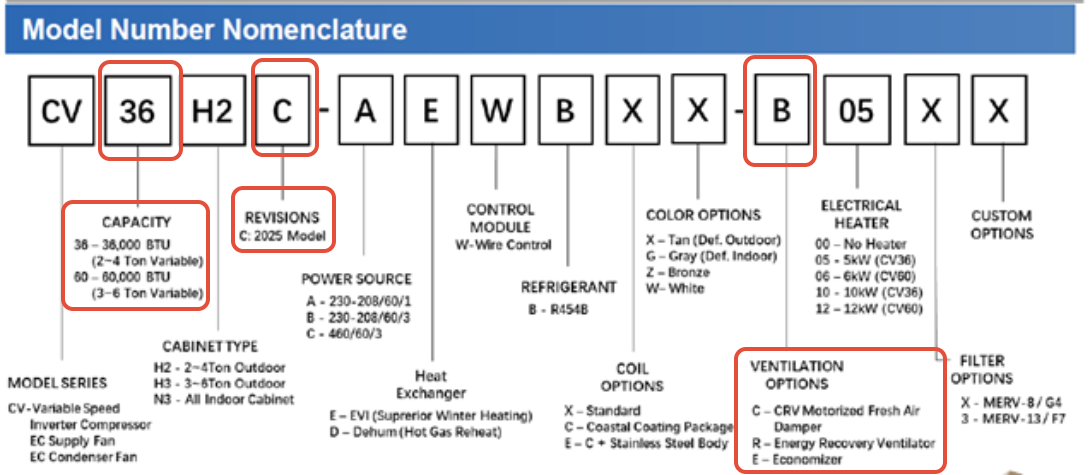
Refer the following Index table for airflow adjustments through different ventilation components.
Ventilation Option | REVB | REVC |
ERV | Option1- Adjust dial (Pg4) Option2- Demand Based Ventilation(Pg7) Option 3- Controller based –(Pg6) | Option 1- Adjust dial (Pg2) Option 2- REVC Demand Based Ventilation(Pg8) Option3- Controller Based - (Pg6) |
CRV | Option 1- Adjust CRV Dial (Pg3) Option2- Demand Based Ventilation (Pg7) Option 3- Controller Based –(Pg7) | Option 1- Adjust CRV Dial (Pg3) Option 2- REVC Demand Based Ventilation (Pg 8) Option3- Controller Based -(Pg6) |
ECONOMIZER | Option 1- Via Controller- FC Max Setting(Pg5) | Option 1- Via Controller-FC Max Setting (Pg 5) |
3.1: Menu instruction to change max ambient air intake dial based
ERV REV C
- Safety
- Turn unit OFF before servicing
- Do not service the ERV section with power applied
- Accessing the ERV Section
- Remove front access panel.
- Remove middle-front ventilation panel to access ERV assembly.
- Locate ERV airflow dial knob mounted above ERV fans.
- ERV Airflow Settings
- Locate the dial reference table at the side of the unit
- Select the appropriate dial position for the required CFM
Selector Position | Approximate Airflow |
ON | 450 CFM |
6 | 420 CFM |
5 | 380 CFM |
4 | 350 CFM |
3 | 300 CFM |
2 | 240 CFM |
1 | 200 CFM |
4. Restoring Unit Operation
4.1Reinstall ventilation panel and front access panel.
4.2 Restore unit power.
5. Verifying ERV Operation
5.1Verify ERV fans are operating properly.
5.2 Verify outside airflow is present at intake section.
- Verify no alarms are active
- Check ERV operation status from controller
- Verify Fresh air fan operation
- Verify Exhaust fan operation
- No ventilation alarms present